Tag Archives: microsoft

Windows 10 19H2 Rumored November 12 Release

There has been a leak in the release of the new Windows 10 1909 update. Named ’19H2′ as of now, Zac Bowden, a senior editor of WindowsCentral, tweeted this yesterday:
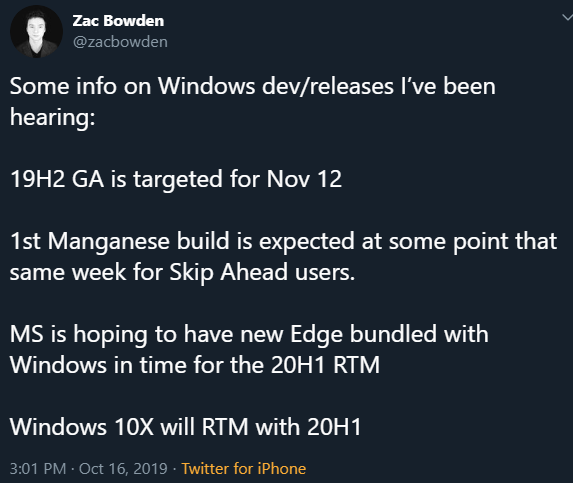
Although November 12th is the predicted release date, Zac did explain that plans have the ability to change. But this was what he had heard from sources.

This update is also said to be a very quick download, as it is small in comparison to other past updates. So in comparison, it’s like Patch Tuesday.

What’s in the new update?

Plenty of these new features within this new update incorporate a number of enhancements, improvements, and additions. Some of them include:

  • create an event straight from the Calendar flyout on the Taskbar
  • Start Menu navigation panes expand so you know where you’re clicking
  • improvements on battery life and performance on certain processors in PC’s
  • added Windows Defender Credential Guard for ARM64 devices
  • “Manage notifications” button to the top of Action Center
  • turn off playing sound when notifications pop up option

For help with Windows 10 issues, call us at 1-800-620-5285.  Karls Technology is a nationwide computer service company with offices in many major cities. This blog post was brought to you from our staff at the Mesa Computer Repair Service, if you need computer repair in Mesa, AZ please call the local office at (480) 240-2950.
Start Menu Issues Still Linger

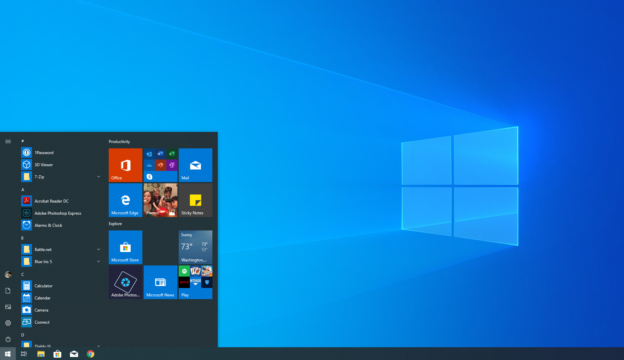
Over the past few weeks, Windows 10 users complained of both printer and Start Menu issues from the Windows Community Board. And while some users are resolving the issues by uninstalling the update all together, Microsoft acknowledged that they haven’t found the issue yet with the Start Menu.

The Patch KB4517389 Microsoft released fixed the printer-spooler headache, but the Start Menu is still being investigated. When it is used, a “critical error” pops up. On October 11, a Microsoft employee wrote a reply in the Windows Community Board, “We are aware of this issue and estimate a resolution to be released in late October.”

Keep an eye out for the expected date of release.

For help with Windows 10 issues, call us at 1-800-620-5285.  Karls Technology is a nationwide computer service company with offices in many major cities. This blog post was brought to you from our staff at the Mesa Computer Repair Service, if you need computer repair in Mesa, AZ please call the local office at (480) 240-2950.
Printer Issues with Windows 10 and Fix Available

Several Windows 10 OS users claimed the new update experienced printing issues. However, Windows Support released an October 3rd update to secure the printing jobs.

This is a required security update that expands the out-of-band update dated September 23, 2019. This security update includes the Internet Explorer scripting engine security vulnerability (CVE-2019-1367) mitigation and corrects a recent printing issue some users have experienced. Customers using Windows Update or Windows Server Update Services (WSUS) will be offered this update automatically. To help secure your devices, we recommend that you install this update as soon as a possible and restart your PC to fully apply the mitigations. Like all cumulative updates, this update supersedes any preceding update.

-Windows Support

This particular update doesn’t affect the upcoming monthly update, which is being released on October 8th. Before updating, Microsoft urges users to install the most recent SSU for their OS beforehand.

For inquiries with Windows 10 updates, call us at 1-800-620-5285.  Karls Technology is a nationwide computer service company with offices in many major cities. This blog post was brought to you from our staff at the Frisco Computer Repair Service, if you need computer repair in Frisco, TX please call or text the local office at (469) 299-9005.

Extended Support for Windows 7

Election year is right around the corner, and Microsoft understands that some voting machines in the U.S. continue to run on Windows 7. So to avoid disruption or issues, Microsoft announced on September 20th that they will be extending Windows Support for the operating systems until the end of 2020.

This particular exception will allow security updates to only the election voting machines.

Today, as part of Microsoft’s Defending Democracy Program, we are announcing that we will provide free security updates for federally certified voting systems running Windows 7 through the 2020 elections, even after Microsoft ends Windows 7 support. I would like to share more on why we help customers move away from older operating systems and why we’re making this unusual exception.

Tom Burt, Corporate Vice President, Customer Security & Trust

The company continues to work with government officials to transition the voting machines from Windows 7 to Windows 10. The extended support will officially end January 14, 2020. This means no security or software updates and no technical support available after this date.

If you are needing help with Microsoft issues, please give us a call at 1-800-620-5285.  Karls Technology is a nationwide computer service company with offices in many major cities.  This blog post is brought to you from our staff at the Plano Computer Repair Service, if you need computer repair in Plano, TX please call the local office at (469) 299-9005.

Microsoft Looking Into Start Menu Bug

An investigation has been open by Microsoft to look into an issue with the Windows 10 Start Menu.

Several users claimed a critical error appears when they try to type anything in the Start Menu. The error states “Your Start Menu isn’t working. We’ll try to fix it the next time you sign in.” One Reddit user said, “Thought I would give KB4515384 a shot on a spare test computer (released today, yeah I’m brave). Now, when I type in something to the start menu to bring up a program, it does absolutely nothing.”

He then updated his issue with, “I uninstalled it and the problem went away.”

This particular bug doesn’t seem to be affecting everyone, but rest assured that Microsoft is looking into it and hoping to resolve the issue as quickly as possible.

For help with Windows 10 issues, call us at 1-800-620-5285.  Karls Technology is a nationwide computer service company with offices in many major cities. This blog post was brought to you from our staff at the Mesa Computer Repair Service, if you need computer repair in Mesa, AZ please call the local office at (480) 240-2950.
High CPU Utilization with Windows 10

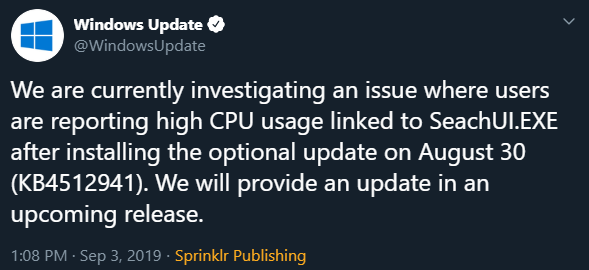
Windows tweeted, “We will provide an update in an upcoming release.”

The elective Windows 10 update KB4512941 has a few issues occurring, including a high CPU usage. The update that was rolled out on August 30th has landed quite a few upset users, stating that there have been reports of high CPU utilization showing up in their Task Manager.

As of today, Microsoft has shared on Twitter their awareness of the issue connected to “SeachUI.EXE” and has gone the necessary steps to get the issue cleared up. Not everyone is experiencing this, but if you are, there is a way that you can resolve this issue. Thankfully, WindowsCentral shares two ways to fix it:

Open Settings.

Click on Update & Security.

Click on Windows Update.

Click the View update history option.

Click the Uninstall updates option.

Select the “Update for Microsoft Windows (KB4512941)” item.

Click the Uninstall button.

Click the Yes button.

Click the Restart Now button.

-KB4512941 removing update

The second one, using the Registry settings, is a riskier fix and may cause permanent damage if done incorrectly. And nobody wants that. It is highly encouraged to create a complete backup of your computer before beginning.

For help with Windows 10 issues, call us at 1-800-620-5285.  Karls Technology is a nationwide computer service company with offices in many major cities. This blog post was brought to you from our staff at the Mesa Computer Repair Service, if you need computer repair in Mesa, AZ please call the local office at (480) 240-2950.

New Calculator Update on Windows

Microsoft announced a handful of new updates coming to Windows in Build 18956 (20H1). Updates include new Network Status view that will also show you how much data is being utilized. Windows Insiders in the Fast ring can preview this build.

Note for Windows Insiders: The preview may carry bugs that can affect your device. To become part of the Windows Insiders Program and try out upcoming features before anyone else, sign up here!

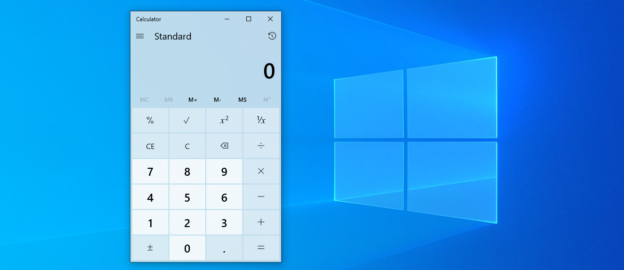
Improvements are all over the place in 20H1, but one in particular is pretty simple, but neat to say the least. The Windows calculator is getting an update! Windows bloggers Dona Sarkar and Brandon LeBlanc wrote, “Over the next few days we’ll be starting to roll out a Calculator app update to Insiders in the Fast ring. This app is most notable because it adds the ability to put Calculator in an Always on Top mode!”

Once the update is available and downloaded to your device, you can click on the icon next to Standard mode switch it to Always on Top.

Source: blogs.windows.com

For help with Windows 10 issues, call us at 1-800-620-5285.  Karls Technology is a nationwide computer service company with offices in many major cities. This blog post was brought to you from our staff at the Mesa Computer Repair Service, if you need computer repair in Mesa, AZ please call the local office at (480) 240-2950.
Microsoft Contractors Can Listen in through Xbox

This has apparently been going on for a while now. With voice commands on the Xbox, contractors from Microsoft have had the ability to listen in on Cortana voice exchanges.

Before, they were able to hear any voice commands to Kinect. Cortana, Microsoft’s voice assistant, was removed from Xbox back in July but Cortana could still be controlled on there via app on iOS or Android. It is also said that Skype calls are being monitored as well and the information is acquired by Motherboard.

Microsoft’s defense says that they’ve been open about using contractors to listen in on commands in order to accumulate information and improve their services.

“We’ve recently updated our privacy statement to add greater clarity that people sometimes review this data as part of the product improvement process. We always get customer permission before collecting voice data, we take steps to de-identify voice snippets being reviewed to protect people’s privacy, and we require that handling of this data be held to the highest privacy standards in the law. At the same time, we’re actively working on additional steps we can take to give customers more transparency and more control over how their data is used to improve products.”

-Microsoft Spokesman

This does raise the question that if they’re able to listen in through Cortana, do they have the ability to listen in through other Microsoft devices? Other companies, such as Apple and Google have done the same thing and have since withdrawn from recording audio through contractors.

If you are needing help with Microsoft issues, please give us a call at 1-800-620-5285.  Karls Technology is a nationwide computer service company with offices in many major cities.  This blog post is brought to you from our staff at the Plano Computer Repair Service, if you need computer repair in Plano, TX please call the local office at (469) 299-9005.

Microsoft Office 365 Phishing Scam Hitting Emails

Scammers are at it again. If you open your inbox and notice a Windows 365 e-mails that appear rather genuine, be weary. Many hackers are quick to gain any kind of personal information from your Microsoft and Outlook accounts. They have the brand logos and everything! Companies in the medical field, financial, insurance and many more are being targeted.

According to Bleeping Computer, “The potential victims’ emails are checked against huge lists of validated email addresses before redirecting them to the phishing forms, which allows the crooks to scrape their targets’ company-branded tenant login pages containing custom backgrounds and banner logos, and have them “dynamically inserted into the phishing landing page.”

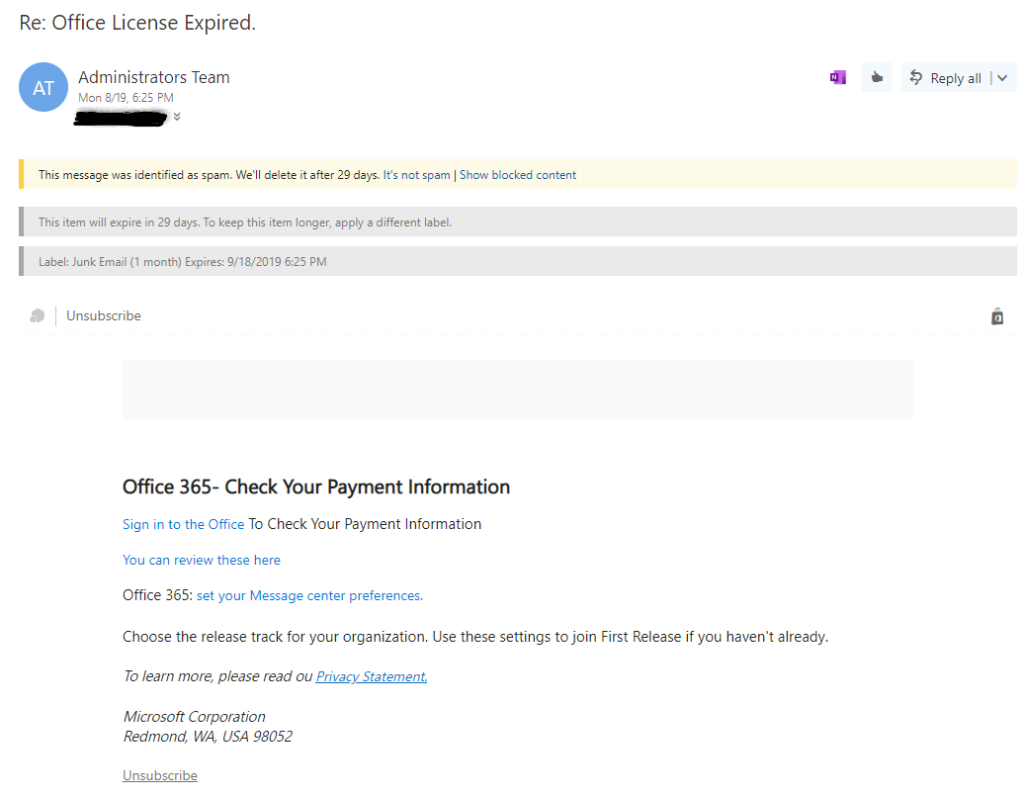
I checked in my old company e-mail, and though there were none in my inbox, there were a few scams in my Junk folder. And they legitimately looked like it was from Office 365. And yes, I do have an Office 365 account.

Often times, you can click on the sender (in this case, Administrators Team) to see the e-mail it was sent from. However, in my case, I was unable to click on it. Obviously, this particular e-mail being in my Junk folder was the first red flag. The second red flag was that I couldn’t see fully who had sent this.

This scam is still active and doesn’t appear to be stopping anytime soon. Pay attention to the senders’ e-mail address and do not click any links in your Junk folder e-mails. That’s all it takes to get your sensitive information compromised.

For inquiries with Microsoft issues, call us at 1-800-620-5285.  Karls Technology is a nationwide computer service company with offices in many major cities. This blog post was brought to you from our staff at the Frisco Computer Repair Service, if you need computer repair in Frisco, TX please call or text the local office at (469) 299-9005.

Windows 10 Needs Users to Update Now

Two severe vulnerabilities are causing problems

Simon Pope, the Incident Response Director, wrote in a blog post on Tuesday about 2 vulnerabilities to Windows OS. This in turn has Microsoft urging users to immediately update their Windows 10.

Pope writes, “The affected versions of Windows are Windows 7 SP1, Windows Server 2008 R2 SP1, Windows Server 2012, Windows 8.1, Windows Server 2012 R2, and all supported versions of Windows 10, including server versions.”

However, he also includes that Windows XP, Server 2003 and 2008 are not affected by this issue.

Your OS is protected from it if your OS automatically updates. If you manually update, go to the Start Menu and type in “Windows Update” access your settings.

For help updating to Windows 10 version 1903 or dealing with any Windows 10 computer issues, call us at 1-800-620-5285.  Karls Technology is a nationwide computer service company with offices in many major cities. This blog post was brought to you from our staff at the Scottsdale Computer Repair Service, if you need computer repair in Scottsdale, AZ please call the local office at (480) 240-2960.